
Economy page
Auction House Manual
Buying
Open the Auction House
Use the Auction House menu to browse listings and buy items from other players.
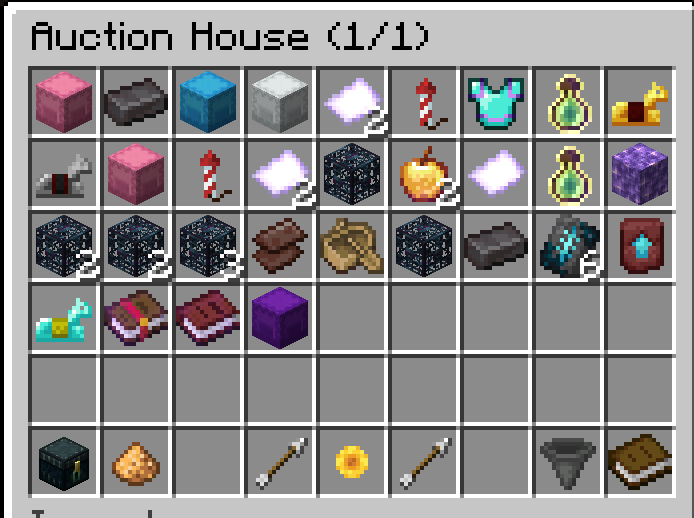
Before buying: check the item name, price, amount, enchantments, and any special contents shown in the tooltip.
Commands
/ahOpens the Auction House menu so you can browse and buy listed items.
Selling
Sell Items
Put the item you want to sell in your hand, then list it with a price and amount.
Check the amount: if you only want to sell part of a stack, make sure the amount matches what you meant to list.
Commands
/ah sell (price) (amount)Lists the item in your hand for the price and amount you enter.Example: /ah sell 500 4 lists four of the held item for 500 each.
Your listings
Cancel or Recover Items
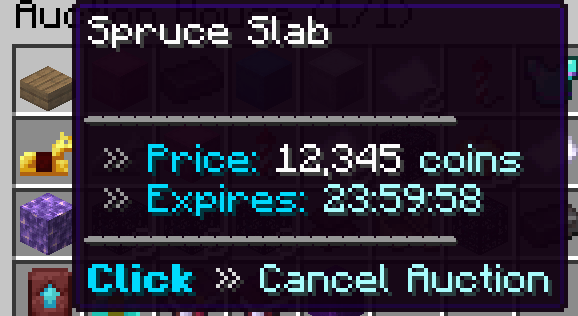
You can cancel your own active listings. Expired listings are recovered from the My Items button in the Auction House menu.
1
Cancel an active listingHover your own item in /ah, then click it to cancel the auction and return it to your inventory.
2
Recover expired itemsIf an item expires, open /ah and use My Items, the ender chest icon in the bottom-left corner of the GUI.
Safety
Shulkers and Scam Reports
Most mistakes happen when players buy too fast. Slow down when the item is expensive, unusual, or inside a shulker.
Viewing Shulkers in /ah: always right-click a shulker in /ah before purchasing it to make sure it has the actual contents you want.
Scams are not allowed: if you find a scam in /ah, please report it to staff with screenshots or clear details.